
How to Export a Photo Report

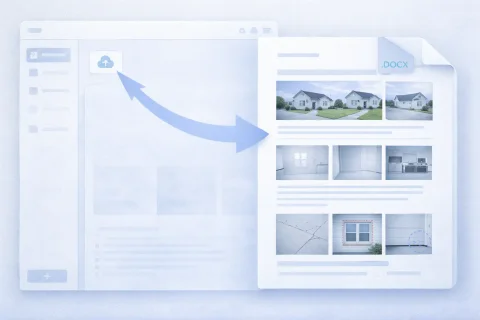
Exporting a photo report gives you a finished document to share with a client or use in your work. The system generates a file while preserving the structure and content. The finished photo report can be used in official documentation or archived.

How to Export a Photo Report

Generating the Final Document

During export, the following happens:

  • photos and comments are combined
  • report structure is preserved
  • a file is created in DOCX format or a report detail archive with photos
This ensures correct data display in the final document.

Try the service

If you're not logged in and just want to test the steps from the guide:
If you want to create full-featured photo reports in the dashboard — top up your balance in your user profile.

Functions Used

This guide uses the following functions:

Where It Is Used

This guide can be applied, for example, in the following fields:

What formats can I export a photo report in?

What formats can I export a photo report in?

Exporting a photo report means creating a ready-made file that can be used outside the system — for delivery, storage, or printing. Available export formats:

DOCX (Word document)

The most versatile format for working with clients and internal documentation. Advantages:
  • convenient for editing after export;
  • suitable for official reports;
  • easily opens on any device;
  • supports document structure (headings, blocks, captions).
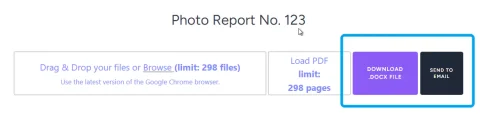
You can download it to your device (computer or mobile phone) or send it to the user's email.

Archive with photos and data

Available from the INSPECTOR mobile app. The archive is sent to the user's email if access to original materials is required. What it includes:
  • images in optimal resolution and quality for storage;
  • report structure by page in table form;
  • shooting context if the coordinate saving function was enabled when shooting with the INSPECTOR mobile app;
  • photo numbers;
  • text comments.
Suitable for:
  • archiving;
  • integration into other systems;
  • additional data processing.

How to Export a Photo Report — Step by Step

Export is done in a few steps within the interface.

Basic steps

  1. Open the finished photo report
  2. Check the structure (pages, photo order, captions)
  3. Go to the document generation function
  4. Select the export format
  5. Download the generated file
The process takes minimal time and requires no additional preparation.

What to Check Before Export

Before downloading the photo report, it is recommended to make sure the document is fully ready.

Structure and order

  • logical sequence of photos;
  • correct distribution across pages;
  • no duplicates.

Captions and comments

  • explanations for images;
  • correct terminology;
  • no empty blocks.

Document layout

This reduces the need for re-export and editing.

Using the Photo Report After Export

The exported document is used in different work scenarios.

Delivering to the client

  • send via email;
  • upload to the client's system;
  • attach to acts and reports.

Archiving

  • storing site history;
  • evidence base;
  • reusing data.

Exporting a Photo Report for Different Tasks

Format and structure may vary depending on the usage scenario.

Inspections and checks

  • documenting violations;
  • survey reports;
  • linking to zones.

Working with clients

  • visual reports;
  • confirmation of completed tasks;
  • transparent communication.

Common Mistakes When Exporting Photo Reports

To avoid problems when using the document, it is important to consider typical mistakes.

Disrupted structure

If photos are placed randomly, the document becomes difficult to understand.

Missing captions

Without comments, photos lose context and value.

Inappropriate format

For example:
  • DOCX is needed for editing;
  • archive — for transferring raw data.

Overloaded pages

Too many images reduce readability.

How to Speed Up Export Preparation

To minimize the time to create the final document:

  • use ready-made templates;
  • sort photos in advance;
  • add captions immediately upon upload;
  • check the structure as you work, not at the end.
This allows you to export the photo report with virtually no rework.

Frequently Asked Questions (FAQ)

The choice depends on the task:
  • DOCX (Word) — suitable for sending to the client, approval, and editing;
  • archive with photos — used for storage, transferring original data, or integration into other systems.
If the report needs to be read and edited, it is better to use DOCX.
Yes, if the report was exported in DOCX format. After export, you can:
  • change text;
  • add or remove images;
  • edit the document structure.
The archive with photos is not designed for editing as a single document.
Yes, the system preserves:
  • photo order;
  • page breakdown;
  • captions and comments;
  • overall document structure.
The final file matches the view created within the service.
Yes, for this, use the export as an archive. The archive contains:
  • original images;
  • data structure (depending on implementation);
  • additional files with descriptions.
This is convenient for further processing or storage.
Yes, especially when using the DOCX format. Such a file can be:
  • sent to the client;
  • attached to work completion certificates;
  • used in reporting;
  • printed.
It is important to check the structure and data correctness before exporting.
Most often, the reason is the wrong choice of report structure:
  • photo report page is poorly filled with photos;
  • too many photos on one page;
  • photos with different orientations placed next to each other;
  • photos are arranged without logic;
  • missing captions;
  • pages overloaded with images;
  • unsuitable format selected.
It is recommended to check the report before export.
Yes, after downloading, the file is ready to use. You can:
  • send it via email;
  • upload it to the client's system;
  • transfer it via messengers;
  • save it to the corporate archive.
Yes, the system supports working with a large number of photos. During this:
  • pages are automatically generated;
  • the structure is preserved;
  • the document remains readable.
For convenience, it is recommended to organize photos and structure in advance.