
GPS PHOTO & GEOLOCATION

App for photos with GPS coordinates, address, and timestamp

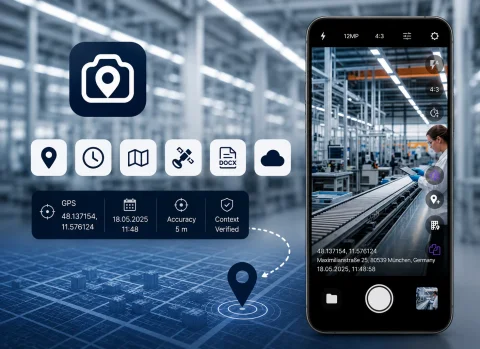
INSPECTOR — mobile app for photo documentation with GPS coordinates, address, capture time, and DOCX photo reports. Ideal for field inspections, construction site surveys, insurance claims, and proof of work completion.

  • GPS coordinates during capture
  • Address via reverse geocoding
  • Date and time on photos
  • DOCX photo reports
  • Verifiable capture context
  • Works offline
App for photos with GPS coordinates, address, and timestamp
GPS
Capture coordinates
Address
Address identification
Offline
Offline operation
DOCX
Photo reports

Download the inspection app

GPS PHOTOS FOR INSPECTIONS

Photo documentation with GPS coordinates and address

INSPECTOR helps you take photos with GPS coordinates, address, date, and time directly during an object inspection. The app suits cases where proving the work location, capture spot, specialist visit, or object state at a specific moment is essential. During photo capture, INSPECTOR can:
  • determine GPS coordinates;
  • add the capture address;
  • save date and time;
  • record coordinate accuracy;
  • preserve capture context;
  • link photos to the photo report.
Photos are automatically placed into the report structure and can be exported to DOCX or processed via the web version.

GEOLOCATION & PHOTO EVIDENCE

GPS photos for field inspections and audits

The INSPECTOR app is used for site photo documentation in construction, insurance, real estate, field service, logistics, and technical inspections. GPS photos are especially useful when you need to:
  • confirm the work execution location;
  • capture the inspection object;
  • verify the shooting location;
  • retain the inspection timeline;
  • prove a staff member’s on-site presence;
  • prepare a photo report for a client;
  • document the object’s condition.
INSPECTOR helps systematize GPS photos within a single document and keep them inside the photo report structure.

GPS PHOTO CAPABILITIES

What the coordinate photo app can do

INSPECTOR combines mobile photo capture, GPS coordinates, capture context, and report generation in a single app.

GPS coordinates on capture

Coordinates are recorded directly at the moment the picture is taken.

Address identification

The app determines the address from GPS coordinates via reverse geocoding.

Timestamps on photos

INSPECTOR can display a timestamp overlay on images.

DOCX photo reports

GPS photos are automatically placed into the photo report structure.

Capture context

The app stores data about the capture, device, and creation time.

Offline mode

Photos can be saved even with a weak internet connection. Determining coordinates and address takes longer on a weak signal. Without internet, photos are saved without coordinates.

USE CASES

What GPS photos are useful for

GPS photos help verify the location and conditions of capture during fieldwork, inspections, and site documentation.

Construction site inspections

  • construction oversight;
  • defect recording;
  • project photo reports;
  • as-built documentation;
  • contractor monitoring.

Insurance claims

  • damage photos;
  • claim event documentation;
  • property surveys;
  • location verification;
  • photo reports for case files.

Property inspections

  • premises condition;
  • apartment & house surveys;
  • handover documentation;
  • rental properties;
  • property condition monitoring.

Logistics & delivery

  • cargo condition;
  • arrival confirmation;
  • delivery GPS location;
  • packaging inspection;
  • client photo reports.

Field service calls

  • on-site maintenance;
  • proof of service;
  • staff monitoring;
  • equipment recording;
  • result photo capture.

Technical inspections

  • equipment checks;
  • facility condition monitoring;
  • diagnostics;
  • non-conformity recording;
  • technical audits.

WORKFLOW

How to take a GPS photo in INSPECTOR

The app helps you quickly record photos with coordinates right during an on-site inspection.

  1. 1

    Create a photo report

    Add a new document for inspecting or checking an object.

  2. 2

    Enable GPS and address

    Activate the display of coordinates, address, and time in the camera settings (by default in the profile, or for a specific inspection during capture).

  3. 3

    Take photos

    INSPECTOR will automatically save GPS coordinates and capture context.

  4. 4

    Add captions and comments

    Annotate photos or highlight important areas if needed.

  5. 5

    Generate the photo report

    Send the DOCX report via email or continue working on the website.

EVIDENCE CONTEXT

What is saved together with GPS photos

INSPECTOR helps preserve not only the image but also its creation context. This is important for verifying capture conditions and documenting fieldwork.

Capture context verification

GPS coordinates

Coordinates are fixed directly at the moment of photo capture.

Capture address

The address is determined based on GPS coordinates via reverse geocoding.

Date and time

The timestamp helps reconstruct the sequence of actions during an inspection.

GPS accuracy

The app saves coordinate accuracy to assess location reliability.

Device model

INSPECTOR records the device used for the capture.

App version

The version of the mobile app used for photo documentation is saved.

Capture context

The photo is linked to the inspection process and the photo report structure.

FAQ

Frequently asked questions about GPS photos in INSPECTOR

Can I add GPS coordinates to a photo?

Yes. INSPECTOR can automatically save GPS coordinates during capture.

Can I add an address overlay on the photo?

Yes. The app determines the address from GPS coordinates via reverse geocoding.

Does GPS photo capture work without internet?

Yes. INSPECTOR supports offline mode and can save photos locally.

Can I generate DOCX photo reports?

Yes. GPS photos are automatically integrated into the DOCX photo report structure.

Is the app suitable for construction inspections?

Yes. INSPECTOR is used for construction oversight, defect photo documentation, and as-built records.

Can the app be used for insurance inspections?

Yes. The app is suitable for damage documentation and insurance claim surveys.

Is the capture context saved?

Yes. INSPECTOR stores GPS, time, address, device data, and other information about the capture process.

Start taking photos with GPS and address in INSPECTOR

Download the mobile app for GPS photo documentation of sites, field inspections, and DOCX photo reports right at the work location.