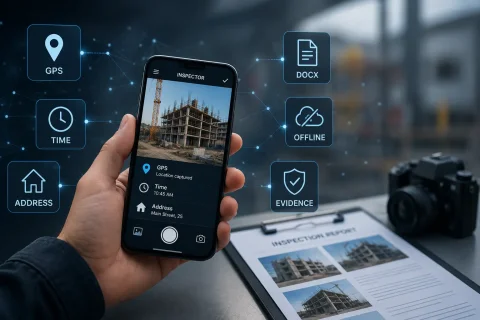

MOBILE PHOTO DOCUMENTATION TECHNOLOGIES

INSPECTOR technologies for photo documentation of inspections, GPS and verifiable context

INSPECTOR uses technologies of mobile photo documentation, GPS geolocation, saving date and time of capture, photo context, offline work and generation of DOCX photo reports. These capabilities help document field inspections, confirm the place and time of capture, preserve report structure and increase trust in inspection materials.

  • GPS and capture address
  • Date and time of photo
  • Capture context
  • Offline photo documentation
  • DOCX photo reports
  • Photo markup
INSPECTOR technologies for photo documentation of inspections, GPS and verifiable context
GPS
Capture geolocation
≤ 20 m
GPS accuracy control
DOCX
Photo reports
Offline
Work without internet

Download the inspection app

Andrey Apanasenko — founder and developer of INSPECTOR

Andrey Apanasenko

Founder and developer of INSPECTOR

Developed based on 17+ years of practical experience

INSPECTOR was created by Andrey Apanasenko, a developer and specialist with practical experience in inspections, forensic examinations, photo documentation, property appraisal, and professional documentation.

TECHNOLOGIES FOR INSPECTIONS

How INSPECTOR links photos to place, time and the inspection process

INSPECTOR is designed not only for taking photos, but also for documenting capture conditions. The application helps save data that is important during construction inspections, insurance claims, property checks, field service visits, quality control and logistics operations. During capture INSPECTOR can save:
  • GPS geolocation of the object;
  • capture address;
  • date and time of photo creation;
  • location accuracy;
  • device and app version data;
  • link of the photo to the photo report;
  • descriptions and image markup;
  • data for subsequent verification of the capture context.
This approach helps separate verifiable technical data from subjective explanations and makes inspection materials more understandable for the client, manager, insurance company, subcontractor or expert.

TRANSPARENT CAPTURE CONTEXT

Evidential context instead of visual image analysis

INSPECTOR does not try to automatically determine the authenticity of a photo by its visual content. Instead, the application saves the capture context: where, when, from which device and within which photo report the photo was created. This approach is especially useful when it is necessary to:
  • confirm the capture location;
  • verify the time of photo creation;
  • distinguish photos taken in the app from imported images;
  • link the photo to a specific inspection;
  • prepare a verifiable photo report;
  • maintain a transparent history of object photo documentation.
The capture context does not replace expert image assessment, but helps confirm the technical conditions of its creation.

KEY TECHNOLOGIES

What technologies are used in INSPECTOR

The INSPECTOR technology cluster combines GPS photos, capture context, offline mode, image markup and photo report generation.

GPS geolocation

The app can save geolocation, address and location accuracy at the moment of capture.

Date and time of capture

Timestamps help reconstruct the sequence of inspection and photo creation.

Photo context

The photo is linked to the photo report, device, application and inspection process.

Offline work

Photos and inspection data can be saved on the device without an internet connection.

Image markup

The user can highlight important zones, object elements and problem areas on photos.

DOCX photo reports

Photos are automatically assembled into a structured photo report for delivery to the client or manager.

WHERE IT IS USED

For which tasks are INSPECTOR photo documentation technologies important

INSPECTOR technologies are useful in any field tasks where it is important to confirm the state of an object, capture location, inspection time and photo report structure.

Construction supervision

Photo documentation of construction phases, object condition, hidden works and subcontractor results.

Insurance inspections

Documenting insurance claims, property damage, vehicles, cargo and real estate.

Property inspection

Recording the condition of an apartment, house, commercial space, finishes and engineering systems.

Field service visits

Confirmation of completed work, installation, repair and maintenance.

Quality control

Documenting the condition of products, equipment, packaging, objects and completed work.

Logistics and cargo

Photo documentation of cargo, packaging, containers, loading, unloading and warehouse receiving.

PHOTO DOCUMENTATION PROCESS

How INSPECTOR technologies work during an inspection

INSPECTOR helps link the photo to the object, time, place and photo report structure.

  1. 1

    Create a photo report

    The user creates a document for a field inspection, check or service task.

  2. 2

    Take photos of the object

    Photos are saved inside the photo report structure.

  3. 3

    Save GPS, address and time

    The app can capture geolocation, address, date and time of capture.

  4. 4

    Add description and markup

    The user can highlight important zones and add annotations to photos.

  5. 5

    Generate a DOCX photo report

    The finished report can be sent or work can continue via Photo-reports.online.

DATA THAT CAN BE VERIFIED

What data forms the technical context of a photo

INSPECTOR helps save a set of parameters that describe the conditions of photo creation and its link to the inspection.

GPS geolocation

Coordinates are fixed through the device's system services at the moment of capture.

Location accuracy

The accuracy parameter shows the possible deviation of the coordinate in meters.

Capture address

The address is determined from the coordinates via reverse geocoding.

Date and time

Timestamps help reconstruct the sequence of photo creation.

Device data

Technical information related to the device and application is saved.

Link to photo report

The photo remains linked to the document within which it was created.

FAQ

Frequently asked questions about INSPECTOR technologies

What technologies are used in INSPECTOR?

INSPECTOR uses mobile photo documentation, GPS geolocation, capture date and time, photo context, offline storage, image markup and DOCX photo report generation.

Does INSPECTOR automatically verify image authenticity?

No. The application does not analyze the image visually. It saves the technical context of the capture: place, time, device, location accuracy and the photo's link to the report.

Can a photo be checked via a public identifier?

Yes. For photos created in the app with context saved, available data can be checked via the verification page using the public identifier.

How does INSPECTOR determine GPS coordinates?

The application uses the device's system services: GMS, HMS or the Android system provider. INSPECTOR does not calculate coordinates on its own and does not modify them manually.

Why may coordinates differ by 10–30 meters?

Accuracy depends on signal reception conditions: building density, shooting indoors, number of visible satellites, Wi-Fi, mobile networks and device capabilities.

Does photo documentation work without internet?

Yes. INSPECTOR can save photos and inspection data on the device, and synchronization takes place later when a connection becomes available.

Can photos from the gallery be used?

Yes, but gallery photos do not have the full creation context in INSPECTOR, so they cannot be verified in the same way as photos taken inside the application.

Use INSPECTOR technologies for verifiable photo documentation of inspections

Download the mobile app for GPS photos, evidential capture context, offline inspections, image markup and generation of DOCX photo reports directly on site.