
INSPECTION PHOTO MARKUP

Inspection Photo Annotations and Defect Markup in a Mobile App

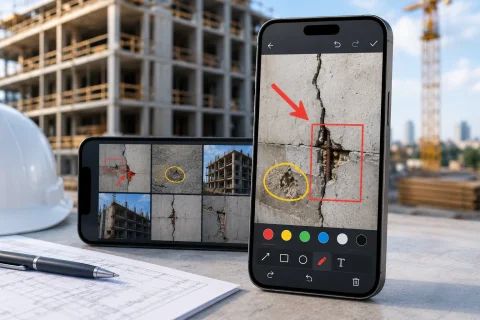
INSPECTOR is a mobile app for inspection photo documentation that lets you highlight defects, add arrows, captions, annotations, and notes to photos during field inspections. Suitable for construction control, insurance assessments, technical inspections, quality assurance, and condition documentation.

  • Arrows & defect highlighting
  • Photo captions
  • Damage markup
  • DOCX photo reports
  • GPS & timestamp
  • Offline mode
Inspection photo markup and defect highlighting in a mobile app
Annotations
Photo markup
DOCX
Photo reports
GPS
GPS coordinates
Offline
Offline capable

Download the inspection app

DEFECT AND DAMAGE DOCUMENTATION

App for inspection photo markup

INSPECTOR helps highlight defects, damages, important areas, and object elements directly during a field inspection. The app lets you add arrows, captions, highlights, and notes on inspection photos without moving images to a separate graphics editor. Photo markup is especially useful when you need to:
  • mark cracks and damage;
  • show construction defects;
  • point out problematic equipment areas;
  • add explanations to inspection photos;
  • prepare a clear photo report for the client;
  • document violations;
  • outline important inspection zones.
INSPECTOR links markup to the inspection process and automatically adds photos to the report structure.

INSPECTION PHOTO MARKUP

Highlighting defects and important areas on photos

During inspections and condition documentation, simply taking a photo of an object is often not enough. It’s important to show: where exactly the defect is; which area needs attention; what exactly was inspected; which elements were damaged; which remarks apply to a specific image area. INSPECTOR helps:
  • draw arrows and lines;
  • frame areas;
  • add text notes;
  • mark defects and damage;
  • make inspection photos clear to the client, contractor, or expert.
The markup is saved in the workflow and automatically included in the DOCX photo report.

PHOTO MARKUP FEATURES

What the INSPECTOR photo annotation tool can do

INSPECTOR helps you perform photo documentation and photo markup within a single mobile workflow.

Arrows & lines

Highlight defects and important elements on inspection photos.

Text notes

Add captions and comments to inspection photos.

Area highlighting

Mark damages, defects, and inspection zones.

Post-capture markup

Edit inspection photos right after taking them with the camera.

DOCX reports

Annotated photos are automatically added to the photo report.

Offline mode

Photo markup is available even without an internet connection.

PHOTO MARKUP PROCESS

How inspection photo markup works in INSPECTOR

The app lets you document defects and mark up photos right during the inspection.

  1. 1

    Take photos on site

    Capture photos of the object during the field inspection.

  2. 2

    Open the built-in editor

    INSPECTOR lets you jump straight to markup after capture.

  3. 3

    Highlight defects and areas

    Use arrows, lines, frames, and text notes.

  4. 4

    Add comments

    Caption inspection photos and explain findings.

  5. 5

    Generate the photo report

    Annotated photos are automatically added to the DOCX report.

FAQ

Frequently asked questions about inspection photo annotations

What is photo annotation in INSPECTOR used for?

The app helps highlight defects, damage, and important areas on photos during inspections.

Can I add arrows and captions to photos?

Yes. INSPECTOR supports annotations, arrows, highlighting of key areas, and comments.

Can I use markup for construction inspections?

Yes. The app is suitable for construction documentation and defect markup.

Do annotated photos go into the photo report?

Yes. Annotated inspection photos are automatically added to the DOCX report.

Does the editor work offline?

Yes. Photo markup during inspections is available without internet.

Can I use GPS and timestamps together with annotations?

Yes. INSPECTOR can save coordinates, address, and timestamps.

Is the app suitable for insurance inspections?

Yes. INSPECTOR helps document damage and highlight it on inspection photos.

Use INSPECTOR for inspection photo markup and documentation with photos

Download the mobile app for inspection photo capture, defect highlighting, annotations, GPS tagging on photos, and DOCX photo report generation right during field inspections.