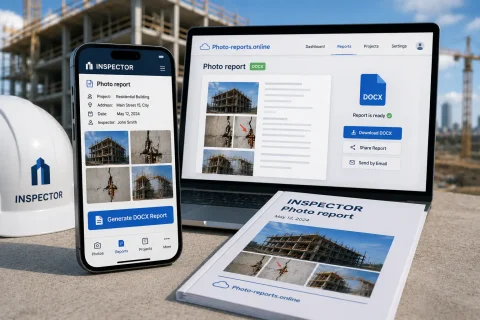

PHOTO REPORTS IN WORD & DOCX

App for Creating Photo Reports in Word (DOCX)

INSPECTOR is a mobile app for creating DOCX photo reports during field inspections and photo documentation. The app automatically gathers photos, captions, GPS coordinates, and comments into a structured Word document right on site.

  • DOCX photo reports
  • Automatic report structure
  • Photos with GPS
  • Captions & comments
  • Offline work
  • Synchronization with website
App for creating photo reports in Word (DOCX)
DOCX
Word format
GPS
GPS coordinates
Offline
Works offline
Web
Web sync

Download the inspection app

Andrey Apanasenko — founder and developer of INSPECTOR

Andrey Apanasenko

Founder and developer of INSPECTOR

Developed based on 17+ years of practical experience

INSPECTOR was created by Andrey Apanasenko, a developer and specialist with practical experience in inspections, forensic examinations, photo documentation, property appraisal, and professional documentation.

PHOTO REPORTS FOR INSPECTIONS

Mobile app for Word (DOCX) photo reports

INSPECTOR helps create photo reports directly during a field inspection of an object. The app automatically collects photos into the document structure, preserves the order of shots, captions, coordinates, date and time of capture, and then generates a DOCX file ready to send to the client or manager. While working, the user can:
  • take inspection photos;
  • save GPS coordinates;
  • add captions and comments;
  • highlight defects and important areas;
  • form the photo report structure;
  • sort photos;
  • create a photo report as a .DOCX file;
  • continue working offline.
INSPECTOR is used for construction photo reports, insurance inspections, technical checks, property inspections, service works, and documenting the condition of objects.

DOCUMENTING INSPECTIONS

Automatic DOCX photo report generation

An ordinary smartphone camera produces individual images but doesn't help organize inspection documentation and prepare photo reports. INSPECTOR automatically links inspection photos with the document and helps you quickly obtain a finished DOCX file. The app helps you:
  • structure inspection photos;
  • create a workflow when compiling the photo report;
  • preserve the order of shots;
  • add comments and explanations;
  • format before and after photos;
  • document defects and damage;
  • generate an inspection report without manually assembling the document.
The DOCX photo report can be sent by email or further edited via the web version at Photo-reports.online.

DOCX PHOTO REPORT FEATURES

What the photo report app can do

INSPECTOR combines photo documentation, inspection documentation, and automatic DOCX file generation in one app.

Automatic DOCX generation

The app automatically creates a photo report in Word format.

Photo report structure

Inspection photos are automatically arranged inside the document.

Photo captions

Add comments and explanations to inspection photos.

GPS and capture date

The app can save coordinates, address, and timestamps.

Before & after photos

Document changes and results of completed work.

Offline work

The photo report can be compiled even without internet.

PHOTO REPORT CREATION PROCESS

How a DOCX photo report is created in INSPECTOR

The app helps organize the photo documentation and report generation right during the object inspection.

  1. 1

    Create a new document

    Open a new photo report to begin the inspection process.

  2. 2

    Take photos of the object

    Inspection photos will automatically be placed into the document structure.

  3. 3

    Add captions & comments

    Label inspection photos and explain defects.

  4. 4

    Save GPS & timestamps

    The app can store coordinates and capture time.

  5. 5

    Generate DOCX report

    Send the finished document or continue working via the website.

FAQ

Frequently asked questions about DOCX photo reports in the mobile app

Can I create DOCX photo reports in INSPECTOR?

Yes. The app automatically generates a photo report as a DOCX file.

Can I add GPS coordinates to the photo report?

Yes. INSPECTOR can save coordinates, address, and timestamps.

Are captions and comments supported?

Yes. Inspection photos can be captioned and commented on.

Can I work offline?

Yes. The app supports offline inspections and local storage.

Is INSPECTOR suitable for construction photo reports?

Yes. The app is used for construction documentation and inspection reports.

Can photo reports be used for property inspections?

Yes. INSPECTOR is suitable for property inspection documentation.

Is there a web version?

Yes. Photo reports are accessible via Photo-reports.online.

Create photo reports as .DOCX files right during inspections

Download the mobile app for capturing the inspection process, GPS photo documentation, DOCX photo reports, annotations, and condition documentation directly on site.