


Sorting Photos in a Photo Report

Sorting photos lets you control the order of images in the photo report and create a logical document structure. The function is used to arrange the sequence of events, work stages, and to correctly display photo documentation.

Sorting Photos in a Photo Report

Where Photo Sorting Is Performed

Where Photo Sorting Is Performed

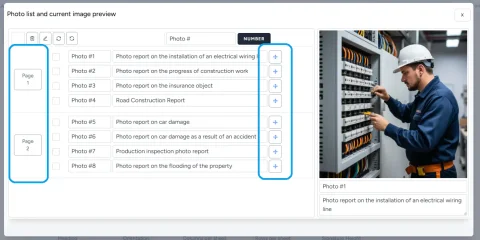
Sorting is performed in the item list available on each page of the photo report layout. This list displays:

  • all photos of the current report;
  • pages with placed images;
  • the overall photo table structure.
This approach allows you to manage both individual images and entire data blocks in one interface.

Use features in the service

If you're not logged in and just want to give it a try:
If you want to create full-featured photo reports in the dashboard — top up your balance in your user profile.

Moving Photos (Drag and Drop)

Moving Photos (Drag and Drop)

Changing the order of photos

Drag and drop is used to change the order of photos. To move a photo:
  • find the desired item in the list;
  • drag the cross icon on the right;
  • move the image to the desired position in the list.
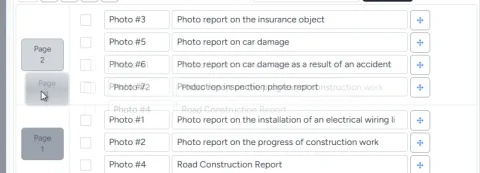
This allows you to quickly reorder photos without additional configuration.

Practical application

Sorting photos is used for:
  • creating before/after reports;
  • showing the sequence of work performed;
  • structuring inspections and checks;
  • grouping images by stages or object zones.
Correct photo order improves the readability of the photo report and simplifies its analysis.

Moving Photo Report Pages

Moving Photo Report Pages

Changing the order of pages

Besides individual photos, you can also change the order of whole pages. To do this:
  • use the page icon on the left side of the list;
  • drag the page to the desired position.
This is convenient when working with large photo reports where controlling the logic of block placement is important.

Moving Photos Between Pages

Respecting layout settings

When moving a photo between pages, the layout settings of the target page are taken into account. If there is enough space on the page:
  • the photo is added to the existing structure.
If there is not enough space:
  • a new page is automatically created;
  • the new page inherits the same layout settings as the target page;
  • the photo is placed on the newly created page.

Why this matters

Automatic page creation allows you to:
  • preserve the structure of the photo report;
  • avoid overflowing pages;
  • keep the chosen layout intact;
  • speed up work without manual adjustment.

Managing the Photo Report Structure

Sorting photos and pages is the main tool for structuring photo documentation. With it, you can:

  • create a logical sequence of images;
  • adapt the photo report to client requirements;
  • quickly restructure the document when data changes;
  • prepare the report for export to Word.
Using sorting is especially important when working with many photos, where order directly affects the readability and value of the report.

Related Guides

This feature is used in various tasks requiring photo documentation and report preparation.

Where It Is Used

This feature can be used to create photo reports in various fields, for example: