
GPS AND GEOLOCATION DURING PHOTO DOCUMENTATION

GPS geolocation and coordinate accuracy in the INSPECTOR mobile app

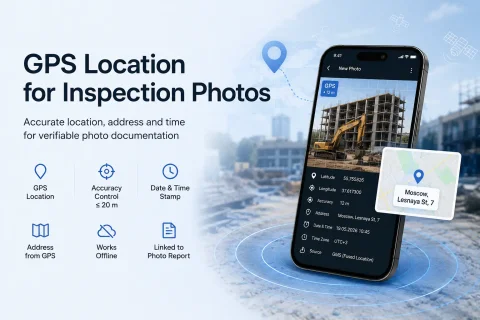
INSPECTOR helps save GPS geolocation, address, date, time, and location accuracy during photo documentation of construction supervision, field service visits, logistics, and object inspections.

  • GPS photos
  • Capture address
  • GPS accuracy
  • GMS and HMS
  • Geotagged photos
  • Work offline
GPS geolocation and coordinate accuracy in the INSPECTOR mobile app
≤ 20 m
GPS accuracy control
GPS
Capture geolocation
GMS/HMS
Android service support
Offline
Work without internet

Download the inspection app

Andrey Apanasenko — founder and developer of INSPECTOR

Andrey Apanasenko

Founder and developer of INSPECTOR

Developed based on 17+ years of practical experience

INSPECTOR was created by Andrey Apanasenko, a developer and specialist with practical experience in inspections, forensic examinations, photo documentation, property appraisal, and professional documentation.

GEOLOCATION DURING PHOTO DOCUMENTATION

How INSPECTOR saves GPS coordinates and capture address

INSPECTOR helps automatically save GPS geolocation, address, date, and time during photo documentation of construction supervision, field service visits, logistics, and object inspections. During capture, the app can save:
  • latitude and longitude;
  • location determination accuracy;
  • capture address;
  • photo date and time;
  • time zone;
  • coordinate link to the photo report;
  • device and app data.
INSPECTOR does not calculate the coordinates itself. The app uses the official Android, GMS, and HMS system services to determine the device's location.

GPS ACCURACY AND LIMITATIONS

Why GPS coordinates can differ by 10–30 meters

GPS accuracy in mobile devices depends on the physical conditions of signal reception and the device's capabilities. Location determination accuracy is affected by:
  • the number of available GNSS satellites;
  • urban development;
  • signal reflection;
  • indoor shooting;
  • weather conditions;
  • Wi-Fi and cellular networks;
  • device capabilities.
Modern smartphones combine data from GPS, GLONASS, Galileo, BeiDou, Wi-Fi, and cellular networks via the Android Fused Location Provider. A GPS coordinate scatter of 10–30 meters is normal for consumer mobile devices and does not indicate an app error. INSPECTOR can use an accuracy control of ≤ 20 meters to enhance the reliability of GPS photo documentation.

HOW GEOLOCATION WORKS

What technologies are used for GPS photos in INSPECTOR

INSPECTOR uses Android system services and official device manufacturer SDKs to determine GPS geolocation and capture address.

GMS and HMS

The app supports Google Mobile Services and Huawei Mobile Services for location determination.

Android Fused Location Provider

The Android system provider is used to combine GPS, Wi-Fi, cellular networks, and other data sources.

GPS accuracy control

INSPECTOR can accept coordinates only when the location accuracy is ≤ 20 meters.

Reverse Geocoding

The app can determine a textual address from GPS coordinates.

Coordinate fixation at capture moment

Geolocation is saved directly during photo creation.

Offline photo documentation

Photos and GPS data can be temporarily saved on the device without an internet connection.

WHERE GPS PHOTO DOCUMENTATION IS USED

What tasks require GPS photos and geolocation

GPS photos are especially important in tasks where it is necessary to confirm the place, time, and conditions of photo documentation of an object.

Construction supervision

Photo documentation of construction phases, hidden works, and object condition linked to the capture location.

Insurance inspections

Confirming the capture location when documenting property damage, vehicles, and real estate.

Property inspection

Recording the geolocation of an apartment, house, or commercial space during the inspection.

Field service visits

Confirming the specialist's visit and the location of installation or repair work.

Quality control

Photo documentation of the condition of products, equipment, and objects with GPS geolocation.

Logistics and cargo

Confirming the location of cargo, container, warehouse, or vehicle.

GPS PHOTO DOCUMENTATION PROCESS

How INSPECTOR determines and saves geolocation

The app helps link the photo with coordinates, capture time, and the object's address.

  1. 1

    User takes a photo

    The photo is created inside the app during an inspection or check.

  2. 2

    System receives coordinates

    Android, GMS, or HMS determine the device's position.

  3. 3

    GPS accuracy is verified

    INSPECTOR analyzes accuracy and can accept coordinates only at ≤ 20 meters.

  4. 4

    Capture address is formed

    From the coordinates, a textual address can be determined via reverse geocoding.

  5. 5

    Data is saved along with the photo

    Coordinates, time, address, and other parameters are linked to the photo report.

TECHNICAL GEOLOCATION DATA

What parameters are used during GPS photo documentation

INSPECTOR helps save technical parameters related to determining the device's location.

More about photo context verification

GPS coordinates

Latitude and longitude are determined by the device's system services.

Location accuracy

The accuracy parameter shows the possible deviation of the coordinate in meters.

Capture date and time

Timestamps help reconstruct the photo documentation sequence.

Capture address

The address is determined from the coordinates via reverse geocoding.

System provider

GMS, HMS, or the Android provider are used to determine coordinates.

Link to photo report

GPS data is saved along with the photo inside the report structure.

FAQ

Frequently asked questions about GPS and geolocation in INSPECTOR

How does INSPECTOR determine GPS coordinates?

The app uses Android system services, Google Mobile Services, Huawei Mobile Services, and the Android Fused Location Provider.

What does accuracy mean in Android?

Accuracy indicates the possible deviation of the coordinate in meters from the actual device position.

Why can GPS coordinates differ by 10–30 meters?

Accuracy depends on the number of satellites, urban development, indoor shooting, Wi-Fi, cellular networks, and device specifics.

Does INSPECTOR manually modify coordinates?

No. The app uses official data from the device's system provider and does not manually shift coordinates.

How is the address determined from GPS coordinates?

The address is formed via reverse geocoding based on latitude and longitude.

Why might the address be incomplete?

If the coordinate is located in an industrial zone, a new district, or near a block boundary, the address may only contain city, street, or region.

Can INSPECTOR be used without internet?

Yes. The app can save photos and some GPS data locally until a connection becomes available.

Is a smartphone's geolocation geodetic?

No. Smartphones do not use RTK correction and are not geodetic equipment.

Why does INSPECTOR use a ≤ 20 m accuracy threshold?

This threshold helps balance the speed of photo documentation and the reliability of the coordinates.

Use GPS photos and geolocation in INSPECTOR

Download the mobile app for GPS photos, inspection photo documentation, capture address determination, and creation of DOCX photo reports with geolocation.