
Photo Report in Construction

A photo report in construction is used to document work stages and monitor task completion. It streamlines reporting and improves communication with the client.

Photo Report in Construction

Purpose of Photo Reports in Construction

In construction, a photo report is not just a collection of images but a tool for control, communication, and verification of completed work. It helps capture the current state of a site and avoid misunderstandings among project stakeholders. Photo reports in construction are used for:

  • work stage documentation — enables visual tracking of construction progress and allows returning to any stage if needed;
  • quality control — provides the ability to identify violations, deviations from the project, and deficiencies;
  • client reporting — simplifies information delivery and makes the process transparent.
Using photo reports reduces disputes, as each stage of work is visually confirmed.

Create a photo report for your use case

Use the service to prepare a photo report for a similar task and see how it works in practice.
Create a photo report without registration
If you want to create full-featured photo reports in the dashboard — top up your balance in your user profile.

Where Photo Reports Are Used in Construction

Photo reports are used at all stages of a construction project — from site preparation to project handover. They are relevant for both small tasks and large-scale construction projects with numerous participants.

Key Application Scenarios
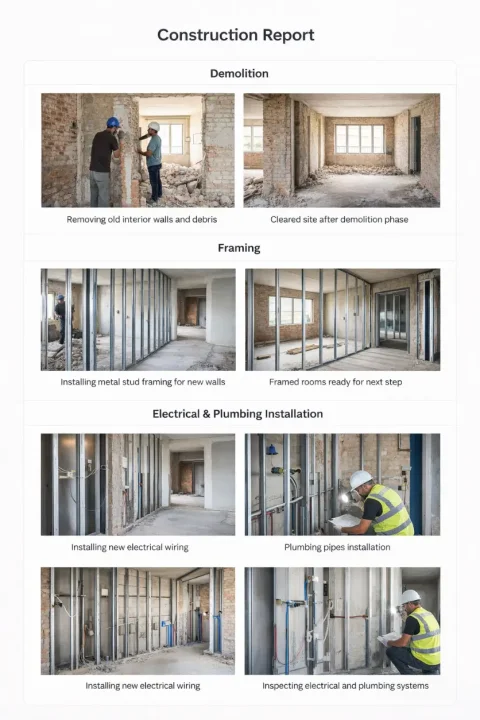
Image 1
  • construction supervision (technical inspection) — documenting compliance of work with the project and standards;
  • design supervision — monitoring adherence to design solutions;
  • hidden works documentation — recording stages that cannot be inspected after completion;
  • contractor reporting to the client — transparent demonstration of completed volumes;
  • subcontractor control — recording quality and task completion deadlines;
  • as-built documentation management — creating an object archive;
  • photo documentation of defects and violations — basis for resolving remarks;
  • preparation of work completion certificates — confirmation of actual execution.
The photo report becomes part of the evidence base and is actively used during inspections, approvals, and closing of work stages.

Mobile field reporting

Start a construction photo report right from the site

If you take photos for a construction report during a field inspection, INSPECTOR helps you immediately capture the image order, captions, GPS coordinates, address, and shooting time.

  • Photo documentation of construction stages
  • GPS, address, and timestamp on photos
  • Offline work on site
  • DOCX report for your customer

Build your construction photo report in INSPECTOR

Take photos on site, add captions, GPS and time data, then send the finished DOCX report.

Field inspection appGPS & timestamp cameraVerify shooting context

Quick Use Scenarios

Photo reports can be applied in various typical tasks. The structure and content of the report change depending on the objective.

These scenarios help quickly adapt the photo report to a specific task without unnecessary configuration.

What Data a Construction Photo Report Should Contain

A comprehensive photo report is a structured document where each photograph carries meaning and context.

Mandatory Elements

  • site photographs — the foundation of the report, capturing the actual condition;
  • image captions — explain exactly what is depicted;
  • reference to the work stage — helps understand at which stage the photo was taken;
  • indication of zone or room — simplifies navigation on site;
  • date of capture — establishes the chronology;
  • comments and explanations — add context and clarifications;
  • numbering and structure — make the report readable.
Without these elements, a photo report becomes just a set of disconnected images.

Additional Data

  • GPS coordinates — confirm the location of the shot;
  • defect markings — allow highlighting problem areas;
  • links to project documentation — provide context;
  • reference to tasks or certificates — connects photos with processes.
Using structured data increases the report's value and simplifies its analysis.

Types of Photo Reports in Construction

The format of a photo report depends on the task and client requirements.

By Task Type

  • completed work photo report — volume confirmation;
  • construction supervision report — quality inspection;
  • defects and remarks report — documenting issues;
  • construction stage report — progress tracking;
  • as-built photo documentation — data archiving.
Each type solves its own task and requires an appropriate structure.

By Document Format

  • photo report in PDF — convenient for sharing and viewing;
  • photo report in Word (DOCX) — suitable for editing;
  • report with photo tables — structured data presentation;
  • report with comments and explanations — a more detailed format.
The choice of format depends on client requirements and internal processes.

How to Create a Photo Report in Construction

The process of creating a photo report can be standardized to reduce time and minimize the chance of errors.

Key Considerations

  • logical sequence — order affects perception;
  • grouping by stages — simplifies analysis;
  • document readability — the report should be understandable without explanations;
  • client requirements — format and structure may vary;
  • final file format — important for delivery.
Sorting and structuring functions allow building a report without manual layout (see also: photo sorting features description).

Problems with Manual Photo Report Creation

When using Word or Excel, photo reports are often created manually, leading to a number of problems.

  • chaotic photo arrangement — difficult to comprehend;
  • manual numbering and captions — very time-consuming;
  • loss of structure during editing — the document quickly "breaks";
  • long preparation time — especially with large volumes;
  • sequence errors — logic is disrupted;
  • difficulties updating the report — requires manual rework.
These problems are especially noticeable when working with a large number of photos and complex sites.

Benefits of Using a Service for Photo Reports

Using a specialized solution allows automating a large part of the work.

For Engineers and Contractors

  • fast report creation — no manual layout;
  • automatic structure — logic is formed by the system;
  • convenient photo sorting — manage order in a couple of clicks;
  • error minimization — fewer manual operations.

For Business

  • standardization of reporting — unified format for all projects;
  • process acceleration — less time for preparation;
  • work transparency — clear picture for the client;
  • reduction of disputes — everything is documented.

Photo Report as a Control Tool and Evidence Base

A photo report in construction serves not only an informational but also a legal function. It allows confirming the actual completion of work and documenting the condition of a site at a specific point in time. It is used for:

  • confirmation of work completion;
  • documenting violations;
  • contractor protection;
  • dispute resolution;
  • reporting to the client.
A clear structure and linking photos to stages enhance the document's reliability and its value in dispute situations.

Best Practices for Compiling Photo Reports

A well-compiled photo report is easier to perceive and quicker to analyze.

Recommendations

  • group photos by stages;
  • use clear captions;
  • avoid duplicating images;
  • maintain a consistent structure;
  • add explanations for complex nodes;
  • use "before / after";
  • build a chronological order.

Mistakes to Avoid

  • missing captions;
  • random photo order;
  • overloaded pages;
  • lack of logic in the structure;
  • mixing of different stages.

Guides Used

For a more detailed elaboration of the process, use these guides:

Functions Used

The service provides tools that simplify the creation of photo reports:

FAQ

It is a structured document with photos that records the progress of construction work and is used for control and reporting.
PDF and Word (DOCX) are most commonly used. The choice depends on client requirements and internal processes.
Yes. With dates, structure, and explanations, a photo report can serve as an evidence base.
The number is not fixed. The important thing is that the photos reflect the essence of the work and are logically structured.
Use specialized services that automate sorting, structuring, and document generation.