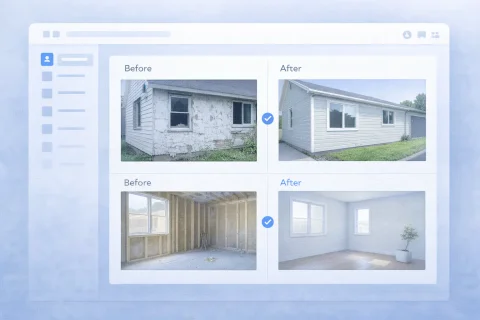

Before and After Photo Report
Before and after photo reports offer a clear visual comparison of changes. Showcase renovation results and project transformations effectively.

What is a photo report in the "before and after" format
A before and after photo report is a document in which photos are selected and arranged to show the change in the object's condition over time. It usually includes paired images: one captures the initial state, the other the result after work completion, defect elimination, cleaning, repair, or other intervention. The main value of this format lies in its clarity. A regular text report can list actions and results, but it's the photos that allow quick understanding of the scale of changes. This is especially important when the report is reviewed not by the executor, but by the client, manager, engineer, inspector, or client representative. The "before and after" format is useful not only for presenting the result but also for internal control. It helps the team standardize reporting, simplifies work approval, and reduces the number of additional questions about execution quality.
Create a photo report for your use case
When a before and after photo report is used
The "before and after" format is applied in scenarios where it's important to show a change in the object's condition, not just attach a set of photos. Below are the main cases where this approach is particularly effective.
Comparing object conditions
Reporting to the client
Internal quality control
Mobile field reporting
Present before-and-after photos in a clear photo report
INSPECTOR fits repair, service, cleaning, restoration, and any work where you need to visually show the initial state and the result.
- Paired before-and-after shots
- Captions for every image
- Consistent order in the report
- DOCX file ready to send to the client
Create a before-and-after report in the app
Capture the starting condition and the result, add your notes, and send the finished report.
Where the "before and after" format is especially in demand
The "before and after" format is widely used in various industries, but it provides the greatest value where the result of work is easier to show visually than to describe in text.
Construction and repair
Cleaning
Technical maintenance and service work
Landscaping and facility operations
Insurance, inspections, and audits
Why the "before and after" format works better than a regular set of photos
A regular photo report may contain good shots, but without a clear structure, the user has to match the images themselves and draw conclusions. The before and after format removes this problem because the comparison logic is already built into the document.
- First, it makes the result obvious. The user doesn't need to figure out which photos belong to the initial state and which to the final state.
- Second, this format speeds up perception. The document is read faster, and the meaning of the changes becomes clear immediately.
- Third, it strengthens the evidential value of the report. When the change is visible on a pair of comparable images, it's harder to dispute the result.
What photos are needed for a before and after photo report
For the format to work really well, it's important not just to take pictures, but to prepare images that can be correctly compared with each other.
Photos of the initial state
Photos of the final state
Overall shots
Detailed shots
Additional confirming photos
How to properly prepare a before and after photo report
For such a document to be truly understandable, it's important to structure it correctly. It's not enough to just place two photos side by side – you need to ensure the comparison is readable without extra explanations.
- First, images should be combined into logical pairs. The user should immediately see which photo corresponds to the "before" state and which to the "after" state.
- Second, it's useful to group photos by zones, rooms, phases, or objects. This is especially important if one report contains many comparisons.
- Third, it's necessary to add captions. Even brief explanations help understand what exactly is shown in the shot, which area is documented, and what the change consists of.
- Fourth, it's important to use a unified page format. If photos are in pairs in one place and chaotic in another, the perception of the report deteriorates.
- Fifth, the order of blocks should be logical. With a large amount of material, correct sorting directly affects the readability of the document. This is especially important when working with a large number of photos and comparison scenarios.
Structure variants for a before and after photo report
The same format can be designed differently depending on the usage scenario. Below are the main structure variants suitable for different types of tasks.
Paired comparison
Grouping by zones
Sequence by phases
Comparison with comments
Typical errors in before and after photo reports
The before and after format seems simple, but in practice, mistakes are often made that cause the report to lose clarity and evidentiary power.
Incomparable photos
No clear labeling of "before" and "after"
Lack of context
Too few explanations
Overloading the report
How to create a before and after photo report online
Using a specialized service allows you to avoid assembling this document manually and quickly form it in a structured way. This is especially convenient if reports need to be created regularly or if multiple people are involved in the work. Usually, the process looks like this:
- First, the initial state of the object is recorded.
- Then the work or changes are performed.
- After that, photos of the final state are taken.
- All images are uploaded to the system.
- The photos are sorted and combined into logical blocks.
- If necessary, captions and explanations are added.
- The finished document is generated for sending to the client, manager, or for archiving.
Advantages of online before and after photo report
Compared to manual document preparation, the online format offers several practical advantages.
- First, it saves time. There's no need to manually insert images into an editor and spend time aligning the document structure.
- Second, it helps maintain a unified reporting standard. This is especially important for companies where photo reports are created by different employees, subcontractors, or service teams.
- Third, it simplifies working with a large number of photos. With proper sorting and grouping, the document remains understandable even with a large volume of material.
- Fourth, the finished report is easier to send to the client, attach to internal documentation, or use as confirmation of completed changes.
Where this format is particularly useful
The "before and after" format is useful where the result must be obvious without lengthy explanations. In practice, it works especially well in several typical scenarios.
For contractors and service companies
For management and operation services
For cleaning and landscaping
For inspections and repeated checks
Used guides
To prepare such a photo report faster, it's useful to rely on related guides. They help not only to compile the document but also to choose a more successful logic for placing photos.
- How to organize photos in a photo report – helps build a sequence of images and avoid a chaotic structure.
- Example of a photo report – shows what a finished document might look like and which design principles work best.
- How to create a photo report – provides a general scenario for document preparation from uploading photos to generating the final file.
Used features
For preparing a before and after photo report, the features that affect the clarity and structure of the document are especially important.
- Photo sorting – allows you to correctly arrange pairs and block sequences so that the comparison logic is obvious.
- Report layout settings – help choose a page format in which the before and after photos are perceived as comfortably as possible.
- Create a photo report – combines photos, structure, and export into a single final document.