
INSPECTIONS WITH A MOBILE APP

Mobile app for inspection photos and field documentation

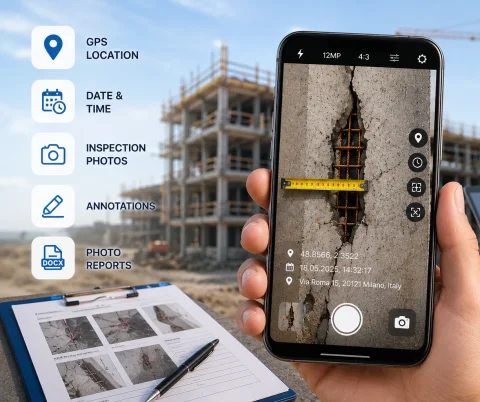
INSPECTOR — mobile app with a camera for inspections, site photo documentation, and DOCX photo reports. Capture inspection photos with GPS coordinates, address, time, annotations, and capture context right during a field visit.

  • Camera for inspection photos
  • GPS and capture address
  • Date and time on photo
  • DOCX photo reports
  • Photo annotation tools
  • Works offline
Mobile app for inspection photos and field documentation
Camera
Site photo documentation
GPS
Capture coordinates
DOCX
Photo reports
Offline
Offline mode

Download the inspection app

CAPTURING THE INSPECTION ON CAMERA

App with a camera for site photo documentation

INSPECTOR helps you perform site photo documentation directly during a field visit. The app's camera is built for CONDUCTING THE INSPECTION, where the goal isn't just taking a picture, but saving it inside the photo report structure together with GPS coordinates, time, address, and capture context. During photo capture, the app can:
  • add GPS coordinates;
  • save date and time;
  • determine the capture address;
  • store inspection metadata;
  • place photos into the report structure;
  • preserve capture context;
  • work offline.
INSPECTOR is suited for construction inspections, insurance surveys, quality control, property walkthroughs, technical inspections, and asset condition documentation.

PHOTO DOCUMENTATION DURING INSPECTION

Using the in-app camera

A standard smartphone camera creates images but doesn't help reflect the step-by-step inspection workflow. INSPECTOR links photos to the inspection process, the document, the report structure, and the capture context. This is especially useful when you need to:
  • take inspection photos on site;
  • record defects;
  • add GPS and timestamp;
  • prepare a photo report;
  • preserve the sequence of shots;
  • document the asset condition;
  • confirm the inspection conditions.
Photos automatically flow into the report structure and can be processed right after capture.

INSPECTION CAMERA CAPABILITIES

What the INSPECTOR camera can do

INSPECTOR brings together a step-by-step capture process, GPS photo documentation, annotation, and photo reports in a single app.

GPS coordinates on capture

Coordinates are saved directly at the moment of photo capture.

Date and time on photo

The app can display date and time overlays on your inspection photos.

Capture address

INSPECTOR can determine the address from the GPS coordinates.

Capture context

Photos are linked to inspection steps and the capture context.

Photo annotation

After capture, you can draw arrows, highlights, and add annotations.

DOCX photo reports

Inspection photos are automatically added to the photo report for the specific case.

USE CASES

What inspections the INSPECTOR camera is built for

The mobile inspection camera helps systematize site photo documentation and inspection images across various industries.

Construction inspections

  • defect photo documentation;
  • progress monitoring;
  • site inspection photos;
  • as-built documentation;
  • contractor oversight.

Technical inspections

  • equipment surveys;
  • asset diagnostics;
  • condition monitoring;
  • inspection workflow;
  • non-conformity documentation.

Insurance inspections

  • damage photos;
  • property surveys;
  • claim documentation;
  • capture location verification;
  • photo reports.

Property inspections

  • room condition recording;
  • rental properties;
  • damage documentation;
  • inspection photos;
  • owner reports.

Quality control

  • production inspection photos;
  • defect tracking;
  • non-conformity photos;
  • production inspections;
  • technical reports.

Field service visits

  • work completion records;
  • result confirmation;
  • staff oversight;
  • "before and after" shots;
  • client reports.

WORKFLOW

How the INSPECTOR camera works

The app helps structure the inspection process; knowing the steps helps the specialist make fewer oversights during the walkthrough.

  1. 1

    Start a new inspection

    Open a new document from the document list.

  2. 2

    Launch the INSPECTOR camera inside the document

    Enter the document and tap the camera icon — the app will open the rear camera with access to GPS and context (if allowed in the user profile).

  3. 3

    Take the shot

    INSPECTOR saves the photos into the photo report structure.

  4. 4

    Add annotations

    After capture, you can highlight defects and add comments.

  5. 5

    Build the photo report

    Send the DOCX report or continue working via the website.

CAPTURE CONTEXT

What data the INSPECTOR inspection camera saves

INSPECTOR helps preserve inspection metadata and context information together with the photos.

More about capture context

GPS coordinates

Coordinates are recorded immediately during capture and instantly sent to the server.

Date and time

The date and time stamp helps reconstruct the inspection timeline.

Capture address

The app can determine the address from the GPS coordinates.

Capture context

INSPECTOR saves available data and irreversibly links photos to coordinates, time, and inspection steps.

Device model

The app stores information about the device used during the capture.

Markup and annotations

After capture, you can highlight key areas and defects.

FAQ

Frequently asked questions about the INSPECTOR camera

Can I use INSPECTOR as an inspection camera?

Yes. The app is designed for photo capture during inspections and site photo documentation.

Can I add GPS coordinates to the photos?

Yes. INSPECTOR can save the GPS location during capture.

Does the app support photo annotations?

Yes. After capture, you can add arrows, highlights, and comments.

Can the camera be used without internet?

Yes. INSPECTOR supports offline mode throughout the entire inspection. Photos are synced by the user once a stable connection is available.

Can I produce a DOCX photo report?

Yes. Inspection photos are automatically integrated into the photo report structure, which is later saved with the .DOCX extension.

Is INSPECTOR suitable for construction inspections?

Yes. The app is used for construction reporting documentation and recording the inspection process.

Can I use photos from the gallery?

Yes. However, photos taken directly through the INSPECTOR camera can carry capture context, whereas gallery images do not.

Use INSPECTOR as your mobile inspection camera

Download the mobile app for inspection photos, GPS photo documentation, annotations, and .DOCX photo reports during field visits and site inspections.