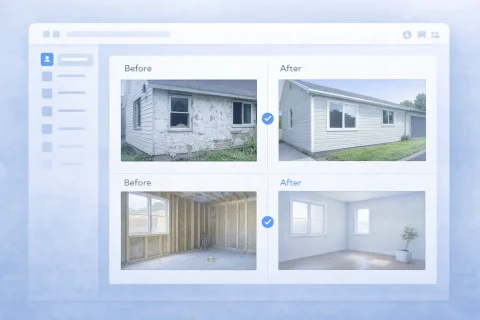

Work Completion Report with Photos

A work completion report with photos provides visual proof of the result. It simplifies project handover and reduces disputes.

Work Completion Report with Photos

What is a work completion report with photos

Visual confirmation of results has become standard across many industries. A text-only report lacks clarity when it comes to repairs, construction, or maintenance. The solution is a photo report — a document that both describes and shows the completed work.

So, a work completion report with photos is a document that:

  • describes the tasks performed
  • includes supporting photographs
  • records the stages or the final outcome

Compared to a text report, a photo report:

  • is quicker to understand
  • provides hard evidence
  • reduces the need for further explanations

Create a photo report for your use case

Use the service to prepare a photo report for a similar task and see how it works in practice.
Create a photo report without registration
If you want to create full-featured photo reports in the dashboard — top up your balance in your user profile.

When to use a photo completion report

A photo report is versatile and helps in many work situations. Below are the main areas where it’s truly indispensable.

Handing over work to the client

When delivering a project or a phase, it’s not enough to simply say “done” — you need to show the result. Here the photo report serves as:

  • proof of contract fulfillment
  • evidence of phase completion
  • the basis for final task sign-off

Internal reporting

For in-house control and record-keeping, the photo report is used as:

  • an employee supervision tool
  • a way to log completed tasks
  • material for quality analysis

Working with subcontractors

When dealing with remote contractors, a photo report lets you:

  • inspect remote sites without being there in person
  • receive reports without traveling to the location
  • standardize the reporting format

Archive and work history

As part of the maintenance history, photo reports create:

  • a database of completed jobs
  • a log of asset servicing
  • a reference for future inspections and planning

Mobile field reporting

A work completion photo report is easier to assemble right in the field

INSPECTOR helps contractors and field service technicians document work results before handing them over to the client: photos, captions, image order, time and location of completion.

  • Before-and-after photos of completed work
  • Captions and comments on images
  • Client-ready DOCX report
  • Location and time stamp for work

Document completed work in the mobile app

Capture the results, add notes, and send a structured photo report to your client.

Photo report appBefore & after photo reportsOffline inspections

What photos go into the report

To make the report effective, certain types of photos are included. Each serves a purpose — from showcasing the result to documenting defects. Typically used photos are:

Before-and-after photos

Comparing the initial state with the final outcome is the most straightforward way to show the impact of the work:

  • demonstration of the result
  • visual proof of change

Work in progress

Capturing key steps and operations confirms the technique and scope:

  • execution stages
  • key operations and intermediate results

Detail shots

Close-ups are invaluable when nuances need to be shown:

  • defects and their repair
  • joints and components
  • problem areas before and after treatment

Overall view

Context and general impression complete the picture:

  • site surroundings
  • final condition after completion

Structure of a work completion report

A well-built structure saves time and eliminates misunderstandings. The recommended sequence of sections is as follows:

Title and site information

Basic details that identify the place and date:

  • site name
  • address or location
  • date of work completion

Description of completed tasks

A list of what was done, with explanatory notes:

  • list of work items
  • contractor’s comments

Photos with captions

Every image is accompanied by a clear description:

  • description of each photo
  • clarification of what exactly is shown

Summary and conclusions

The final status and special notes that wrap up the document:

  • completion status (finished, revision needed, etc.)
  • additional remarks and recommendations

How to properly compile a photo report

A tidy layout builds trust in the report and shows professionalism. To make the report clear and professional:

Getting the image order right is especially important — it directly affects how the report is perceived. Scattered, random photos confuse and reduce the document’s value.

Common mistakes when creating reports

Even with good photos, a report can become useless if common mistakes are made. Avoid the following pitfalls:

Lack of structure

A chaotic set of photos with no logic:

  • photos added in random order
  • no logical sequence — hard to follow the progress of work

No captions

Without explanations, meaning gets lost:

  • it’s unclear what exactly is shown
  • context is missing — the photo might show a completed stage or a defect

Too many or too few photos

Extremes are equally harmful:

  • an overloaded report is tiring and distracts from the main point
  • lack of evidence leaves room for disputes

Inconsistent formatting

Lack of uniformity hurts perception:

  • different photo sizes and orientations make uniform layout difficult
  • inconsistent page structure looks unprofessional

How to create a work completion report with photos online

Modern online tools greatly simplify the process of creating a photo report. You don’t have to manually lay out a document in Word — everything happens quickly right in the browser. Using a dedicated service you can:

Basic scenario

The step-by-step process takes just a few minutes:

  1. Upload photos
  2. Sort them by phase
  3. Add captions
  4. Choose a layout
  5. Generate the document

Benefits of an online photo report

Compare the traditional approach with modern tools — the advantage is clear. Compared to manual compilation:

  • timesaving — instead of hours of work you get a finished document in minutes
  • consistent document standard — all reports look tidy and uniform
  • easy handling of large photo sets — the service doesn’t lag and helps with sorting
  • ready to send to the client — PDF is generated instantly, no extra editing required

Where this format is especially in demand

Industries and areas where the photo report has become the de facto standard:

  • construction and renovation
  • technical maintenance
  • cleaning and services
  • equipment installation
  • insurance
  • facility inspections

Guides used

To tackle the task of creating such a photo report, use the following step-by-step instructions. They’ll help you quickly master all the service’s capabilities.

Functions used

To prepare this kind of photo report, the following key platform functions are often used:

FAQ

We’ve gathered answers to the most common questions about photo reports for completed work.

A complete report includes a description of the completed tasks, supporting photos with captions, and a final status. This is the minimum set that ensures full transparency for both parties.

Yes, photos convey visual information very well, but they shouldn’t completely replace text. The best option is a combination: pictures serve as proof, and text explanations reveal details that can’t be grasped from the image alone.

There’s no magic number. The main criterion is sufficiency for an objective assessment without overloading. A rule of thumb: enough to verify each stage, but not so many that the report becomes difficult to scroll through.

Yes, that’s one of the key use cases. Photo reports let you monitor task completion at remote sites without needing to be there in person, saving time and resources.