
PHOTO REPORTS FOR INSPECTIONS AND FIELD WORK

App for creating photo reports with GPS, photos and DOCX

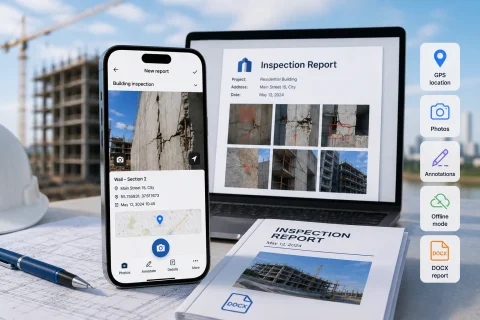
INSPECTOR is a mobile app for creating photo reports during field inspections, inspections and object photo documentation. The app automatically collects photos into the report structure, saves GPS coordinates, date, time and generates DOCX photo reports right on site.

  • DOCX photo reports
  • Field photo documentation
  • GPS and capture address
  • Before-and-after photos
  • Offline work
  • Website sync
App for creating photo reports with GPS, photos and DOCX
DOCX
Report generation
GPS
Capture coordinates
Offline
Work without network
Web
Website sync

Download the inspection app

MOBILE PHOTO REPORTS

App for creating photo reports on site

INSPECTOR helps create photo reports directly during a field inspection of an object. The app automatically links photos to the document, preserves the shot order, GPS coordinates, date, time and enables structured DOCX files without manual report assembly. During work the user can:
  • take inspection photos;
  • add comments and captions;
  • save GPS coordinates;
  • record date and time;
  • highlight defects and important areas;
  • sort photos;
  • generate a DOCX photo report;
  • continue working offline.
INSPECTOR is used for construction photo reports, insurance inspections, completed work control, technical inspections, service visits and object condition documentation.

PHOTO REPORTS FOR WORKFLOWS

Photo documentation and automatic report generation

A regular smartphone camera produces separate images but doesn't help organise the photo report preparation process. INSPECTOR turns inspection photos into a structured document that can be sent to a client, contractor, insurance company or manager. The app helps you:
  • record the object condition;
  • save inspection photos;
  • prepare DOCX photo reports;
  • document defects and destruction;
  • preserve the inspection timeline;
  • shape an inspection workflow;
  • confirm inspection conditions.
Photos automatically fall into the photo report structure and can be processed right after the shot is taken.

PHOTO REPORT CAPABILITIES

What the photo report app can do

INSPECTOR combines inspection photos, GPS photo documentation, annotations and DOCX report in a single app.

Automatic photo report structure

Photos are automatically added to the photo report for document workflow.

DOCX photo report

INSPECTOR generates DOCX files for sending and archiving.

GPS and address

The app can save coordinates, address and timestamps.

Before-and-after photos

Photo documentation of work stages and object condition.

Photo annotations

Annotations, arrows and area highlighting for photo reports.

Offline mode

Photo reports can be compiled even without a network connection.

PHOTO REPORT CREATION PROCESS

How a photo report is created in INSPECTOR

The app helps organise photo documentation directly during a field inspection.

  1. 1

    Create a new document

    Create a new photo report on the app's home screen.

  2. 2

    Take photos

    The app saves the photos into the photo report structure.

  3. 3

    Add GPS and comments

    INSPECTOR can save coordinates, address and annotations.

  4. 4

    Sort photos

    Inspection photos can be arranged in the required order.

  5. 5

    Generate DOCX report

    Send the photo report or continue working via the website.

GPS AND CAPTURE CONTEXT

What is stored inside a photo report

INSPECTOR helps preserve inspection metadata and capture context together with inspection photos.

FAQ

Frequently asked questions about INSPECTOR photo reports

What is INSPECTOR used for?

INSPECTOR helps create photo reports and reporting documentation during field checks and inspections.

Can DOCX photo reports be generated?

Yes. The app automatically generates DOCX during photo documentation.

Is adding GPS coordinates to photos supported?

Yes. INSPECTOR can save coordinates, address and timestamps.

Can I work offline?

Yes. The app supports offline mode and local data storage on the user's device.

Can annotations be added to photos?

Yes. INSPECTOR supports arrows, highlighting important areas and comments.

Is the app suitable for creating construction photo reports?

Yes. INSPECTOR is used for construction documentation and reporting on condition checks of construction projects.

Is there a web version?

Yes. Photo reports are available through Photo-reports.online.

Create photo reports in INSPECTOR right during the inspection

Download the mobile app for inspection photos, GPS photo documentation, DOCX reports, annotations and documenting the inspection process on your mobile phone right on site.