
Team Collaboration on Photo Reports

Team collaboration with photo reports lets you neskolkim polzovatelyam sovmestno sozdavat, redaktirovat and use photo documentation within odnogo proekta. Funktsionalnost orientirovana on B2B-zadachi, gde in protsesse uchastvuyut neskolko spetsialistov. Service Photo-reports.online ensures tsentralizovannyy dostup to photo reportm and uproschaet vzaimodeystvie between uchastnikami team.

Team Collaboration on Photo Reports

What is team collaboration in photo reportkh

Team collaboration — this feature sovmestnogo dostupa to photo reportm and dannym proekta for neskolkikh users. V ramkakh odnogo rabochego prostranstva uchastniki can:

  • otkryvat photo reports;
  • redaktirovat strukturu and soderzhanie;
  • work with photos and podpisyami;
  • use edinye data within proekta.
This allows you to vystroit consistent protsess preparing photo documentation without peredachi files vruchnuyu.

Use these features in your workflow

If you’re not registered yet — open the tool and try these features while creating your first inspection report or photo documentation. If you already have an account — start building your reports in the dashboard.

Access to Photo Reports for Team Members

Obschiy dostup to dannym

Photo reports available vsem uchastnikam team, kotorym predostavlen dostup to proektu. This lets you:
  • work with aktualnoy versiey report;
  • isklyuchit neobkhodimost peresylki files;
  • uskorit obmen informatsiey between spetsialistami.

Rabota with odnim reportom

Neskolko users can work with odnim photo report, vypolnyaya raznye zadachi:
  • uploading photos;
  • editing structure;
  • preparation podpisey;
  • finalnaya proverka and oformlenie.
Takoy podkhod osobenno polezen when raspredelenii roley inside team.

Team Management

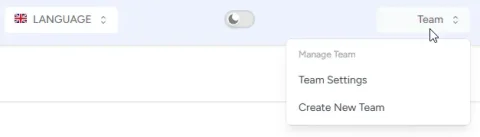
V komande user can sostoyat lyuboe number users.

Lichnaya team user

Pri sozdanii uchetnoy zapisi for user sozdaetsya uchetnaya zapis lichnoy team. V etoy komande polzovatel:
  • yavlyaetsya administratorom;
  • can priglashat in nee drugikh users
  • can udalyat users iz team.
Takzhe polzovatel can create lyuboe number novykh komand for collaborative work with photo reports by raznym proektam.

User and Access Management

Dobavlenie uchastnikov

V komandu you can add users for collaborative work nad photo reports. Kazhdyy uchastnik poluchaet dostup to proektam and dannym, svyazannym with ego zadachami.

Kontrol dostupa

Upravlenie dostupom lets you:
  • ogranichivat dostup to dannym;
  • predostavlyat dostup only to nuzhnym reportm;
  • kontrolirovat rabotu uchastnikov.
This important for korporativnoy sredy, gde trebuetsya razgranichenie otvetstvennosti. Dve roli users:
  • administrator - can priglashat novykh users and work with photosotchetami
  • editor - can work with photo reports
Kazhdyy polzovatel can pokinut chuzhuyu komandu. This you can sdelat in profile user.

Centralized Storage for Photo Reports

Vse data team khranyatsya in edinoy sisteme. This vklyuchaet:

  • photos;
  • strukturu photo reports;
  • captions and settings.
Tsentralizovannoe khranenie lets you:
  • izbezhat poteri data;
  • obespechit dostup to informatsii iz lyuboy tochki;
  • use consistent istochnik data for vsekh uchastnikov.

Practical Uses of Team Collaboration

Funktsionalnost vostrebovana in zadachakh, gde uchastvuyut neskolko spetsialistov.

Stroitelstvo and upravlenie proektami

  • fiksatsiya stages work raznymi sotrudnikami;
  • preparation reports for client;
  • kontrol kachestva completion work.

Inspektsii and checks

  • collaborative work inspektorov;
  • sbor data with raznykh assets;
  • generation edinogo report.

Strakhovanie and ekspertiza

  • fiksatsiya sostoyaniya assets;
  • work neskolkikh ekspertov;
  • preparation dokazatelnoy bazy.

Benefits of Team Collaboration

Using collaborative work with photo reports lets you:

  • sokratit vremya preparing reports;
  • isklyuchit dublirovanie data;
  • povysit prozrachnost protsessov;
  • obespechit consistent standart photo documentation.

Related Features

Team collaboration is used vmeste with drugimi vozmozhnostyami service:

  • uploading photos in photo report;
  • editing images;
  • sorting photos;
  • generation photo report in document.
Sovmestnoe ispolzovanie etikh funktsiy lets you vystroit polnyy tsikl work: from sbora data do preparing gotovogo document.

Related Guides

Eta feature is used across different workflows, gde trebuetsya photo capture and preparation reports.

Where It Is Used

Feature can byt ispolzovana for creating photo reports across different industries, onexample: