
Editing Photos in a Photo Report

Editing photos in a photo report lets you prepare images for inclusion in the document without using third-party software. The built-in editor provides basic photo processing and helps bring materials to a uniform look before forming the photo table or photo documentation. The functionality is focused on practical tasks: adjusting images, fixing technical defects, and preparing photos for the report within a single workflow.

Editing Photos in a Photo Report

How to Open the Image Editor

The photo editor is directly accessible within the photo report interface.

Opening the editor

To start editing:
  • upload photos to the photo report;
  • click any photo on the page;
  • the built-in image editor will open.
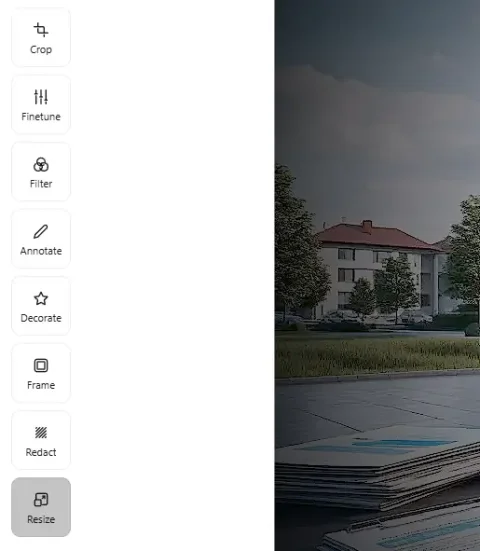
Editing is performed without navigating away from the page, allowing you to quickly make changes and see the result in the context of the report.

Underlying technology

The editor uses the Pintura.js library, which provides:
  • browser-based image processing;
  • high performance when editing photos;
  • quality preservation during editing.
This is especially important when working with many images in photo documentation.

Use features in the service

If you're not logged in and just want to give it a try:
If you want to create full-featured photo reports in the dashboard — top up your balance in your user profile.

Core Photo Editing Tasks

Editing images in the service addresses several practical tasks.

Preparing photos for the report

Before including in the photo report, images are brought to a uniform look:
  • orientation is corrected;
  • unwanted areas are removed;
  • composition is adjusted.
This improves the readability of the photo table and simplifies document understanding.

Processing images for documentation

When preparing photo documentation, it is important to:
  • eliminate visual distortions;
  • ensure correct object display;
  • preserve the informational value of shots.
The editor allows you to perform these tasks without using external tools.

Minimizing manual processing

Using the built-in editor:
  • reduces report preparation time;
  • eliminates the need to export and re-upload files;
  • reduces the risk of data or quality loss.

Basic Editing Tools

Basic Editing Tools

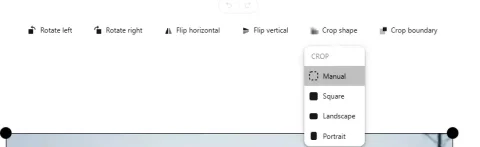
Rotate and orient image

Adjusting orientation

Photos may have incorrect orientation due to shooting conditions or device metadata. Available actions:
  • rotate image by 90°;
  • correct orientation;
  • bring photos to a correct view for the document.

Why this is important

Correct orientation:
  • improves report readability;
  • ensures correct display in Word and other editors;
  • eliminates the need for manual correction after export.

Cropping the image

Removing unwanted areas

The cropping tool allows you to:
  • highlight the key part of the image;
  • remove extraneous elements at the edges;
  • focus on the subject.

Practical application

Cropping is used for:
  • highlighting defects or damage;
  • removing uninformative background;
  • preparing images for compact placement in a photo table.

Why this is important

Well-cropped images:
  • make the report more structured;
  • simplify visual analysis;
  • improve documentation quality.

Zooming and composition adjustment

The editor allows you to control image display:
  • zoom in/out;
  • reposition the view area;
  • align the subject relative to the frame.
This is important when preparing photos for printing and inclusion in reporting documents.

Working with Explanatory Graphics

Working with Explanatory Graphics

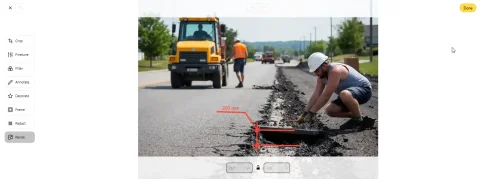
One of the key editor capabilities is adding explanatory elements directly to the image.

Adding graphic elements

Tools available:
  • arrows;
  • lines;
  • shapes;
  • area highlighting.
These elements are used to point out important details in the image.

Text annotations

The editor allows you to:
  • add text to the image;
  • place captions next to objects;
  • make explanations directly on the photo.

Why this is important for B2B tasks

In the context of photo reports and documentation:
  • images are often used as evidence;
  • it is important to clearly indicate what is being noted;
  • text and graphics reduce the risk of misinterpretation.
Explanatory elements are especially relevant for:
  • construction reports;
  • inspections;
  • insurance claims;
  • technical assessments.

Color and Visual Adjustments

The image editor also supports basic visual settings.

Adjusting image parameters

Image 1
Possible adjustments:
  • brightness;
  • contrast;
  • color balance.

Practical application

These tools are used for:
  • improving detail visibility;
  • compensating for shooting conditions (low light, overexposure);
  • enhancing image readability.

Limitations

The editor is not intended for artistic editing or complex retouching. All tools are focused on practical use in documentation.

Saving Changes

Applying edits

After making changes:
  • the result is saved within the photo report;
  • the image is updated in the interface;
  • changes are taken into account when exporting to the document.

Working without losing context

Editing does not break the report structure:
  • photo order is preserved;
  • links to captions remain;
  • no need to re-upload files.

Browser-Based Operation Features

Image editing is performed client-side.

Advantages

  • high processing speed;
  • no need to send data to the server for each action;
  • reduced network load.

Performance impact

Speed depends on:
  • user device performance;
  • number of images processed simultaneously;
  • size of source files.

When to Use Image Editing

Editing photos is recommended in the following cases:

  • before adding images to the final photo report;
  • when you need to highlight key details;
  • when preparing photo documentation for a client;
  • when forming reports for expert assessment or verification.

The Role of Editing in Photo Report Preparation

Editing images is a data preparation step, not an independent task.

What editing provides

  • improves visual material quality;
  • increases photo informativeness;
  • makes the report structured and clear.

Why this is important

In B2B scenarios, the photo report is used as:
  • a communication tool with the client;
  • an evidence base;
  • part of official documentation.
Properly prepared images reduce the risk of errors and increase trust in the results.

Conclusion

Editing photos in a photo report is a built-in tool for basic image processing, aimed at documentation tasks. It allows you to:

  • modify photos before adding them to the report;
  • perform image processing for documentation;
  • prepare photos for inclusion in a photo table or photo documentation;
  • add explanatory graphics and text.
Using the editor inside the Photo-reports.online service provides a unified and controlled image processing workflow without needing external solutions.

Where It Is Used

This feature can be used to create photo reports in various fields, for example:

Где используется

Функция может быть использована для составления фотоотчётов в различных сферах деятельности, например: