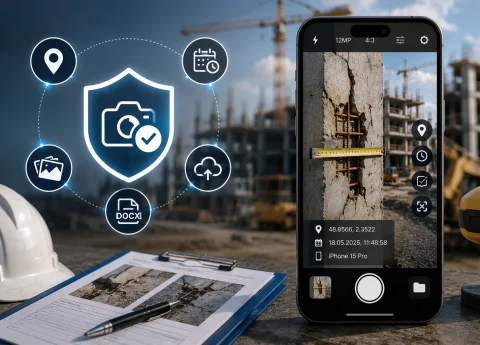

PHOTO DOCUMENTATION & CAPTURE CONTEXT

App for photo documentation and capture context verification

INSPECTOR — mobile app for photo documentation and capturing evidentiary material with GPS coordinates, time, address, and capture context. Suitable for field inspections, insurance surveys, construction oversight, damage recording, technical inspections, and asset condition documentation.

  • GPS capture confirmation
  • Date and time of capture
  • Image context
  • DOCX photo reports
  • Verifiable photo documentation
  • Offline photo documentation
App for photo documentation and capture context verification
GPS
Capture coordinates
Timestamp
Date and time
Context
Capture context
DOCX
Photo reports

Download the inspection app

PHOTO DOCUMENTATION MATERIAL FOR INSPECTIONS

Mobile app for photo documentation and capture condition confirmation

INSPECTOR helps you do more than just take pictures — it preserves a documented capture context. The app records data associated with the image creation process: GPS coordinates, date, time, address, device information, and other details important for documenting inspections and surveys. This approach is especially useful when you need to:
  • confirm the shooting location;
  • preserve the event timeline;
  • record the object state;
  • document damage;
  • prepare a photo report;
  • distinguish original captures from gallery images;
  • increase inspection workflow transparency.
INSPECTOR is used for mobile photo documentation in construction, insurance, real estate, field service, technical inspections, and other site documentation scenarios.

VERIFIABLE CAPTURE CONTEXT

What photo documentation means in INSPECTOR

In INSPECTOR, asset state documentation is not built on "guessing" image authenticity, but on recording the capture conditions. The app can save:
  • GPS coordinates;
  • capture date and time;
  • coordinate accuracy;
  • capture address;
  • device model;
  • app version;
  • data about the image creation process.
This approach helps link the photo to a specific inspection workflow and increases trust in site photo documentation.

PHOTO DOCUMENTATION CAPABILITIES

How INSPECTOR helps create images with evidential value

INSPECTOR brings together mobile photography, GPS, metadata, and photo reports into a single inspection workflow.

GPS photography

Coordinates are saved directly at the moment the image is created.

Capture date and time

Timestamps help reconstruct the sequence of events.

Capture address

The app can determine the address from GPS coordinates via reverse geocoding.

Image context

INSPECTOR stores metadata and links the photo to the inspection workflow.

DOCX photo reports

Photos are automatically added to the photo report structure.

Offline photo documentation

Even without internet, the app continues saving data locally.

USE CASES

What tasks INSPECTOR's evidentiary photo capture is suitable for

Photo documentation is especially critical in fields where confirming inspection conditions and location is needed.

Construction inspections

  • defect photo documentation;
  • work phase control;
  • as-built documentation;
  • contractor oversight;
  • condition confirmation.

Insurance surveys

  • damage recording;
  • property survey;
  • claim incident photos;
  • capture location confirmation;
  • insurance photo reports.

Property inspections

  • premises condition recording;
  • rental properties;
  • site handover;
  • damage documentation;
  • owner reports.

Technical inspections

  • equipment walkthroughs;
  • diagnostics;
  • violation recording;
  • technical condition monitoring;
  • documented inspections.

Field service visits

  • proof of work completion;
  • result recording;
  • staff oversight;
  • "before and after" photos;
  • client reports.

Logistics & delivery

  • cargo photos;
  • arrival confirmation;
  • packaging condition check;
  • damage recording;
  • location verification.

WORKFLOW

How evidentiary photos are created in INSPECTOR

The app helps link photos to the inspection process, time, location, and the photo report workflow.

  1. 1

    Create a photo report

    Open a new document for the inspection workflow.

  2. 2

    Take photos of the site

    INSPECTOR can save GPS, address, and capture date.

  3. 3

    Add comments

    Caption the images and highlight important areas.

  4. 4

    Preserve capture context

    The app links the photos to the inspection process.

  5. 5

    Build the photo report

    Send the DOCX report or continue working via the website.

DOCUMENTED CONTEXT

What data is saved alongside the photo

INSPECTOR helps preserve the metadata and capture context tied to the image creation process.

More about capture context collection principles

GPS coordinates

Coordinates are recorded at the moment of photo capture.

Date and time

Timestamps help reconstruct the inspection chronology.

Capture address

The address is determined from the coordinates via reverse geocoding.

Location accuracy

The app saves coordinate accuracy for reliability assessment.

Device model

INSPECTOR saves device information associated with the photo capture.

App version

The mobile app version used during capture is saved.

Inspection workflow

Photos stay linked to the inspection report and workflow process.

FAQ

Frequently asked questions about photo documentation in INSPECTOR

Can INSPECTOR be used as evidence of photo capture?

Yes. The app helps save GPS, date, time, and capture context alongside your photos.

Can I add GPS coordinates to photos?

Yes. INSPECTOR can automatically save GPS coordinates during capture.

Is the capture address saved?

Yes. The app can determine the address from the GPS coordinates.

Does the app work without internet?

Yes. INSPECTOR supports offline photo documentation and local data storage.

Can I generate DOCX photo reports?

Yes. Photos are automatically added to the structure of a DOCX photo report.

Is the app suitable for construction inspections?

Yes. INSPECTOR is used for construction oversight and documented inspections.

Does INSPECTOR analyze the image content?

No. The app helps preserve context metadata and the inspection workflow; it does not perform AI-based image analysis.

Create photos with documented context in INSPECTOR

Download the mobile app for photo documentation, GPS photography, and field inspections, with DOCX photo report generation and capture context preservation.