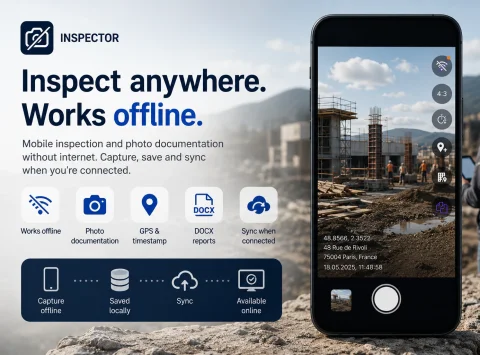

OFFLINE INSPECTION & PHOTO DOCUMENTATION

App for inspections and photo documentation without internet

INSPECTOR — mobile app for field inspections and site photo documentation without internet. Take photos, save GPS coordinates, build DOCX photo reports, and sync data later once you're back online.

  • Works without internet
  • Offline site photo documentation
  • GPS and capture time
  • DOCX photo reports
  • Local data storage
  • Sync after reconnection
App for inspections and photo documentation without internet
Offline
Works offline
GPS
Capture coordinates
DOCX
Photo reports
Sync
Delayed synchronization

Download the inspection app

MOBILE INSPECTIONS WITHOUT A NETWORK

App for field inspections offline

INSPECTOR helps you perform inspections and photo documentation of sites even when there's no internet. The app is suitable for work on construction sites, at remote locations, in technical rooms, basements, industrial zones, and other places with unstable connectivity. During an inspection, you can:
  • take photos with the built-in camera;
  • add captions to photos;
  • sort your shots;
  • build the structure of the photo report.
All data remains stored locally on the device and can be synced with the server later.

WORK AT REMOTE LOCATIONS

Offline photo documentation for poor-connectivity sites

The INSPECTOR mobile app is used for photo documentation in places without a stable GSM or Wi-Fi signal. This is especially important for:
  • construction sites;
  • remote properties;
  • plant rooms;
  • warehouses and logistics areas;
  • underground structures;
  • site surveys;
  • production floors;
  • equipment inspections;
  • property assessments.
Even without internet, you can continue working with documents and photos without interrupting the inspection process.

OFFLINE CAPABILITIES

What the offline inspection app can do

INSPECTOR combines mobile photo capture, local data storage, and delayed synchronization into a single app.

Local photo storage

Photos and inspection data stay on the device until internet becomes available.

Offline document editing

Users can create and edit photo reports without a network connection.

Delayed synchronization

Once the connection is restored, the app sends data to the server.

DOCX photo reports

After syncing, photo reports can be sent and downloaded.

Report structure preserved

Photo order, captions, and document pages are saved locally.

GPS photo documentation

INSPECTOR can store GPS coordinates even with weak or no internet, provided the device receives location data via GNSS (GPS/GLONASS/Galileo).

USE CASES

What field work INSPECTOR's offline mode is built for

Offline photo documentation is critical in industries where field work happens in locations with poor internet connectivity.

Construction sites

  • site progress photos;
  • phase control;
  • remote location inspections;
  • working under weak signal;
  • as-built documentation.

Equipment inspections

  • production-line walkthroughs;
  • technical checks;
  • asset diagnostics;
  • work inside industrial facilities;
  • defect recording.

Logistics & warehousing

  • cargo photo documentation;
  • packaging inspection;
  • warehouse walkthroughs;
  • hangar and terminal work;
  • field audits.

Property inspections

  • room-by-room surveys;
  • remote properties;
  • condition recording;
  • lease and handover;
  • photo reports for owners.

Service calls

  • equipment repair & maintenance;
  • work verification;
  • visit confirmation;
  • result photo proof;
  • client reports.

Field inspections

  • surveys of distant sites;
  • work outside urban infrastructure;
  • GPS photo documentation;
  • condition monitoring;
  • mobile inspection.

WORKFLOW

How INSPECTOR's offline mode works

The app automatically switches to delayed synchronization when network quality drops.

  1. 1

    Create a photo report

    Open a new document for the field inspection.

  2. 2

    Keep working without internet

    Photos and data will be stored locally on the device.

  3. 3

    Capture site photos

    INSPECTOR saves the document structure and your photos locally on the device.

  4. 4

    Add captions and comments

    You can edit the photo report even while offline.

  5. 5

    Sync data later

    Once the network is back, the app sends the data to the server.

LOCAL STORAGE & CONTEXT

What is saved during an offline inspection

Even without a connection, INSPECTOR keeps saving photos inside the app's local database.

More about capture context

Inspection photos

Photos stay local until synchronization is triggered.

GPS coordinates

The app stores capture coordinates when the device provides location data.

Date and time

Timestamps help reconstruct the sequence of actions.

Photo report structure

Page order and photo placement are kept locally.

Captions and comments

INSPECTOR preserves descriptions and annotations on photos.

Capture context

Photos stay linked to the inspection process and workflow.

Sync status

The user sees which documents haven't been sent to the server yet.

FAQ

Frequently asked questions about INSPECTOR offline mode

Does INSPECTOR work without internet?

Yes. The app supports offline mode and can save photos and documents locally.

Are photos saved when there is no network?

Yes. All photos remain on the device until synchronization is triggered.

Can I build photo reports without internet?

Yes. INSPECTOR lets you create and edit photo reports offline.

When are data sent to the server?

Once a stable internet connection is available, the user performs the synchronization.

Can I use GPS in offline mode?

Yes. INSPECTOR can store GPS coordinates when the device provides location data.

Is the app suitable for construction sites?

Yes. INSPECTOR is used for photo documentation and inspections in areas with poor connectivity.

Can I continue work via the web after syncing?

Yes. After synchronization, photo reports are available in the web version at Photo-reports.online.

Start performing inspections offline with INSPECTOR

Download the mobile app for offline site photo documentation, field inspections, and DOCX photo reports — even without a stable connection.