Photo Captions in a Photo Report

Captions to photo allow structure photo report and sdelat photo documentation ponyatnoy for analiza and peredachi client. Feature obedinyaet numeratsiyu and description photos, formiruya consistent tekst captions for kazhdogo images. Ispolzuetsya when preparation photo reports, photostablits and inspektsionnoy documentation in construction, expert assessment and vyezdnoy rabote.

Photo Captions in a Photo Report

Where add captions to photo

V service predusmotreno dva sposoba add or otredaktirovat description konkretnogo photos:
Captions pod kazhdoy photosgrafiey

Pod kazhdym imagem in photo report available dva polya:
  • Nomer photos
  • Description photos
Etot sposob udoben when rabote with otdelnymi imagesand neposredstvenno in makete pages.

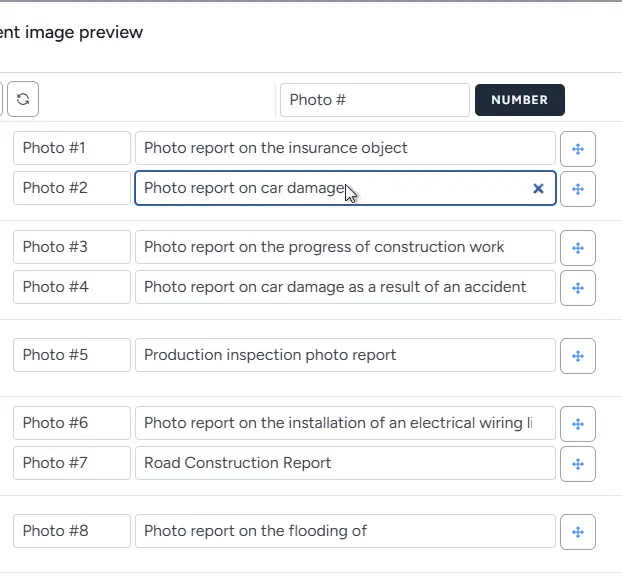
Captions in spiske photos

Image 1
Na kazhdoy page photo report available spisok photos (otkryvaetsya by knopke). V etom spiske:
  • otobrazhayutsya vse images tekuschego report;
  • for kazhdoy photos available polya nomer and description;
  • you can quickly redaktirovat captions at once for neskolkikh images.
Etot rezhim optimalen, if trebuetsya massovo podpisat photos.

Use these features in your workflow

If you’re not registered yet — open the tool and try these features while creating your first inspection report or photo documentation. If you already have an account — start building your reports in the dashboard.

Numbering photos

Avtomaticheskaya numeratsiya with prefiksom

Pole nomera you can zapolnit automatically:
  • zadayte prefiks (onexample, «Photo»);
  • prefiks nastraivaetsya:
    • on pervoy page photo report;
    • or in rasshirennykh nastroykakh report;
  • nazhmite knopku ryadom with prefiksom — sistema automatically pronumeruet vse photos.
V rezultate kazhdaya photo poluchaet poryadkovyy nomer with ukazannym prefiksom.

Why It Matters

Avtomaticheskaya numeratsiya:
  • ensures consistent standart oformleniya photo report;
  • reduces veroyatnost oshibok when ruchnom vvode;
  • speeds up preparation photo documentation when bolshom kolichestve images.

How the final caption is formed

Summaryovaya caption photos is formed automatically iz dvukh chastey:

  • nomer photos;
  • tekst descriptions.
Format captions: Nomer + tochka + probel + description Primer: Photo №1. Obschiy vid This ensures edinoobrazie vsekh podpisey in photo report and uproschaet vospriyatie document.

Saved caption templates

Dobavlenie templateov opisaniy

V tablichnom makete photo report ryadom with polem descriptions available feature:
  • dobavleniya teksta in spisok tipovykh opisaniy.
This allows you to sokhranyat chasto ispolzuemye formulirovki (onexample, «Obschiy vid», «Defekt pokrytiya», «Uzel krepleniya»).

Povtornoe ispolzovanie

Tipovye descriptions:
  • available vo vsekh photo reportkh user;
  • allow quickly zapolnyat captions without povtornogo vvoda;
  • redaktiruyutsya and udalyayutsya on the page profilya.

Why It Matters

Using templateov:
  • speeds up protsess annotatsii images;
  • ensures consistent stil descriptions photos;
  • reduces vliyanie chelovecheskogo faktora when preparation reports.

Faster caption entry

Navigatsiya using klaviatury

V spiske photos podderzhivaetsya navigatsiya using klavishi Tab:
  • kursor posledovatelno perekhodit between polyami;
  • you can quickly vvodit nomer and description for bolshogo number of images.

Practical Applications

Feature osobenno polezna, kogda trebuetsya:
  • podpisat bolshoy obem photos;
  • prepare photo report in szhatye sroki;
  • obespechit soglasovannost podpisey in photostablitse.

Role podpisey in photo report

Korrektnye captions to photo — klyuchevoy element kachestvennoy photo documentation. Oni allow:

  • odnoznachno identifitsirovat image;
  • peredat kontekst (mesto, step work, defekt);
  • povysit tsennost photo report for client;
  • uprostit posleduyuschiy analiz and proverku data.
Gramotno oformlennye captions delayut photo report ne prosto naborom images, a polnotsennym rabochim documentom.

Related Guides

Eta feature is used across different workflows, gde trebuetsya photo capture and preparation reports.

Where It Is Used

Feature can byt ispolzovana for creating photo reports across different industries, onexample: