Uploading Photos to a Photo Report

Uploading photos — klyuchevoy step creating photo report in service Photo-reports.online. Service lets you add images and PDF-documenty, automatically podgotavlivaya ikh for dalneyshego formirovaniya strukturirovannogo photo report. Funktsionalnost available how zaregistrirovannym polzovatelyam, tak and gostyam with ryadom ogranicheniy.
Uploading Photos to a Photo Report

Formaty and sposoby upload photos

Supported image formats

V service you can upload fayly the following formatov:
  • JPEG / JPG
  • PNG
  • WEBP
Formaty HEIC / HEIF on dannyy moment ne podderzhivayutsya and trebuyut predvaritelnogo preobrazovaniya before zagruzkoy.

Uploading images and PDF files

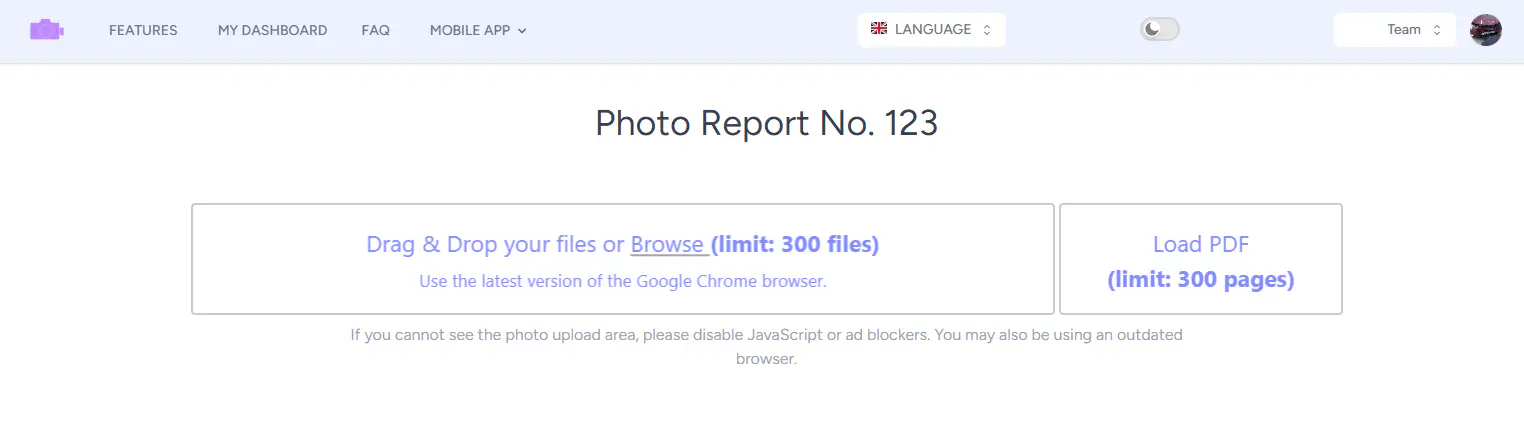
On the photo report creation page, you can add content in two ways:
  • upload images as separate files;
  • upload a PDF document.
When a PDF file is uploaded:
  1. the user’s browser splits the file into pages;
  2. each page is converted into an image;
  3. the images are then uploaded to the photo report in sequence.
This makes it possible to use existing documents as the basis for a photo report.

Use these features in your workflow

If you’re not registered yet — open the tool and try these features while creating your first inspection report or photo documentation. If you already have an account — start building your reports in the dashboard.

Limitations and razlichiya for users

Guest capabilities

Gosti can use main funktsional service without registratsii, vklyuchaya creation photo reports. Ogranicheniya:
  • do 100 photos in one report;
  • vodyanoy znak on imageskh;
  • otsutstvie sokhraneniya reports;
  • nedostupna team collaboration;
  • net capabilities use tipovye captions.

Capabilities for registered users

Zaregistrirovannye users poluchayut rasshirennye capabilities:
  • do 300 photos in one report;
  • otsutstvie vodyanykh znakov;
  • sokhranenie reports and photos;
  • ispolzovanie tipovykh podpisey;
  • work in komande.
Pri neobkhodimosti limit on number photos can byt uvelichen by zaprosu.

Obrabotka images when zagruzke

Browser-side processing

Osnovnaya chast obrabotki vypolnyaetsya on storone brauzera user. This reduces nagruzku on server and speeds up rabotu service. Limitations by kolichestvu photos svyazany with proizvoditelnostyu ustroystv: on malomoschnykh kompyuterakh obrabotka bolshogo number of images can zamedlyatsya.

Image optimization and compression

V protsesse upload vypolnyaetsya automatic optimizatsiya:
  • preobrazovanie images in format WEBP;
  • szhatie do maksimalnogo razmera 1024×1024 px;
  • koeffitsient kachestva — okolo 0.7.
Takoe kachestvo ensures:
  • korrektnoe otobrazhenie in documentkh Word;
  • feature pechati on tsvetnykh printerakh;
  • balans between kachestvom and razmerom file.

Photo upload speed

Skorost upload zavisit from:

  • moschnosti ustroystva user;
  • number of photos;
  • razmera files;
  • skorosti internet-soedineniya.
V srednem:
  • 100 images by ~1 MB zagruzhayutsya za 25–40 sekund.
Pri uvelichenii number of or razmera files vremya upload can suschestvenno vozrastat.

Automatic sorting and captions

How captions are generated

Photo captions are generated automatically:
  • when uploading images, the file names are used;
  • when uploading a PDF, the file name and page number are used.
This makes later editing and structuring much easier.

Image sorting

Photos are sorted automatically:
  • by file name when images are uploaded;
  • by page order when a PDF is uploaded.
You can reorder them manually whenever needed.

Upload error handling

If when zagruzke voznikaet oshibka:

  • problemnyy file isklyuchaetsya iz ocheredi;
  • ostalnye images prodolzhayut zagruzhatsya;
  • polzovatelyu otobrazhaetsya uvedomlenie with ukazaniem file, vyzvavshego oshibku.
This allows you to izbezhat ostanovki vsego protsessa upload.

Photo upload recommendations

Dlya stabilnoy work rekomenduetsya:

  • use images razmerom do 1–2 MB;
  • upload photos partiyami when slabom ustroystve;
  • predvaritelno konvertirovat nepodderzhivaemye formaty;
  • proveryat imena files for udobnoy automatic sortirovki.

Related Guides

Eta feature is used across different workflows, gde trebuetsya photo capture and preparation reports.

Where It Is Used

Feature can byt ispolzovana for creating photo reports across different industries, onexample: